Campus & Branch Network
DoneMulti-building campus plus remote branch with VLANs, inter-VLAN routing, DHCP and RIPv2 over serial WAN.
Topology / Screenshots
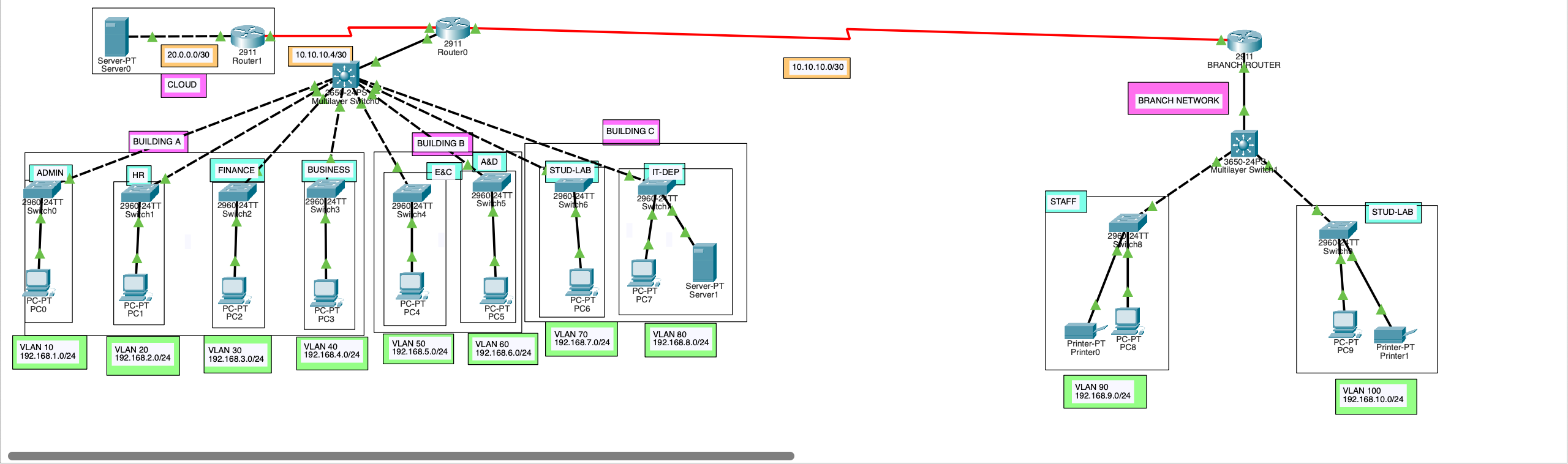
Overview
Design a segmented, routable enterprise-style network spanning multiple campus buildings, a remote branch and a simulated cloud network.
Tools & technologies
Cisco Packet TracerCisco IOSVLANs802.1QRouter-on-a-StickDHCPRIPv2DCE/DTE SerialSubnetting
What I built
- Department-based VLANs, each with its own subnet; access and 802.1Q trunk ports as required.
- Router subinterfaces for inter-VLAN routing, each acting as the VLAN's default gateway.
- Individual DHCP pools per network with default-router and DNS settings.
- Serial DCE/DTE WAN links between campus, branch and cloud, 64,000 bps clock rate on DCE.
- RIPv2 dynamic routing so routes are advertised and learned automatically.
Key configs & code
ip dhcp pool Admin-Pool
 network 192.168.1.0 255.255.255.0
 default-router 192.168.1.1
 dns-server 192.168.1.1
!
interface GigabitEthernet0/0.10
 encapsulation dot1Q 10
 ip address 192.168.1.1 255.255.255.0
!
interface Serial0/3/0
 ip address 10.10.10.5 255.255.255.252
clock rate 64000router rip
version 2
network 10.0.0.0
network 192.168.1.0
network 192.168.2.0
network 192.168.3.0
network 192.168.4.0
network 192.168.5.0
network 192.168.6.0
network 192.168.7.0
network 192.168.8.0ip dhcp pool Staff-pool
network 192.168.9.0 255.255.255.0
default-router 192.168.9.1
dns-server 192.168.9.1
ip dhcp pool Student-pool
network 192.168.10.0 255.255.255.0
default-router 192.168.10.1
dns-server 192.168.10.1
!
interface GigabitEthernet0/0.90
encapsulation dot1Q 90
ip address 192.168.9.1 255.255.255.0
!
interface GigabitEthernet0/0.100
encapsulation dot1Q 100
ip address 192.168.10.1 255.255.255.0Challenges & troubleshooting
- [Add challenges & troubleshooting notes]
What I learned
- [Add what you learned]